In short
4Sums as a board game: you against computer opponents (three on the standard board, seven on the double board), or in teams of two. Roll the die, move your four counters onto letter squares, and be the first to get all four onto different letters that spell a real 4-letter word whose letter values reach the target above the board with +, −, × and /. You can play a single game or a tournament of rounds played for tokens.
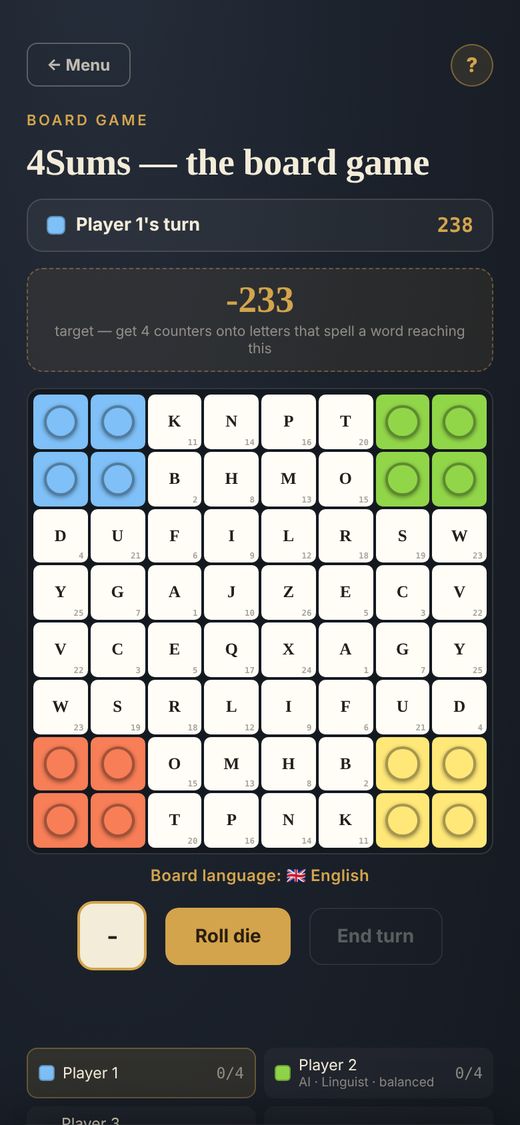
The board
The board is an 8×8 grid of letter squares with a home corner for each player. Each language has its own board and alphabet map, so letter values differ from language to language. A label above the board shows the board language, for example “Board language: French”. Choose Polyglot to play on the combined board: words from any of the twelve languages count, and the letters share one 45-letter alphabet. Each letter’s value is printed on its square, and the alphabet map in the helper tools lists them all.
Objective
Get all 4 of your counters onto different letter squares that spell a real word, so that the letters' values reach the target shown above the board. The values are combined from left to right with +, −, × and / using the usual order of operations (× and / first, then + and −); there are no brackets.
Moving
Roll the die, tap one of your counters, then tap a highlighted square to move there. Squares in red aren't reachable this turn, whether they're too far or blocked along the way. If none of your counters can move, your turn is skipped.
Capturing
Land exactly on an opponent's counter to send it back to the square your own counter started this turn from.
Claiming a win
Once all 4 of your counters sit on different letters, a “Claim win” button appears, only on your own turn. First arrange the letters into a real word and check it; you can still cancel and keep playing at this point. Then pick the operators to reach the target. You get one attempt per turn: a word that isn't in the word list, or a sum that misses the target, fails the claim and ends your turn. (Cancelling before you check is free.) Example: with a target of 13 and counters on T, A, K and E (T=20, A=1, K=11, E=5), TAKE with −, −, + gives 20 − 1 − 11 + 5 = 13. In a team game the four letters can come from any of your and your partner's active counters combined, and either of you can claim at the end of either of your turns.
Playing against AI
Computer-controlled players roll and move automatically, and claim a win themselves the moment they find one on their own turn. Each AI has a word knowledge level (Reader knows everyday words, Linguist about the top half of the word list, Lexicographer the full list; the tiers nest) and a personality: balanced, impulsive or thoughtful, both shown beside its name in the player list. The personality shapes how it plays: how often it disrupts an opponent who has three counters placed (about half the time for a balanced player, 25% more likely if that opponent plays next), how readily it takes risks, and in tournaments how much it stakes. Impulsive players stake more tokens on a single tile and stack several on the same one; thoughtful players stake carefully on the letters they are most likely to use. Pick each AI's knowledge and personality yourself in the options, or let the game choose at random. In a team game your AI partner always checks for a win after you press End turn, and after its own move it waits for you to claim or end its turn.
Turn timer
Every turn has a countdown, set in the options. If it runs out, the turn is forfeited. The timer pauses automatically while the app isn't active: if you switch to another tab or app, a "Paused" banner appears and the clock stops until you come back. It also stops while the claim pop-up is open.
Options
Before each game you can set: the game mode (Standard or Tournament); Teams on or off; the board, standard (4 players) or double (8 players); for tournaments, the number of rounds (4 to 10), the starting tokens (10, 20 or 40) and tile staking on or off; the turn time (1 to 4 minutes); the board language, or Polyglot; the target range (the game picks a target between your minimum and maximum); the letter-value mapping, either Standard (alphabetical) or Random this game (the values are shuffled across the letters, so check the alphabet map); helper tools on or off; the board theme, Standard (light tiles with dark letters) or Reversed (black tiles with amber letters); and the AI opponents, Random or Choose each one's knowledge and personality.
Tournament mode and teams
Tournament. Switch the game mode to Tournament to play a series of rounds for tokens. You choose the number of rounds (4 to 10), the tokens everyone starts with (10, 20 or 40) and whether tile staking is on. Before every round each player puts a pot ante into the pot, and with staking on you can also stake tokens on letter tiles (you may put several tokens on one tile). The current pot is shown while you play. The first player to make a valid claim takes the pot plus every stake on the tiles their winning word uses; stakes on the other tiles go back to their owners. In round 1 you choose the board and move first; afterwards the player with the most tokens chooses and moves first. Most tokens after the last round wins.
Double board. Choose the double board for 8 players: two boards of the same kind, side by side in landscape on a desktop and stacked in portrait on a phone. Players are split between the two boards and take turns in one order.
Teams of two. Switch Teams on: 4 players make two teams, and 8 players on the double board make four. Teams are chosen at random. Partners share one word: any four of your combined active counters (on letter squares) can spell it, and either partner can claim a win at the end of either partner's turn. Partners never move one after the other, and on the double board they sit on different boards. In a team tournament the tokens are pooled by team, stakes and winnings belong to the team, and teams are ranked at the end.
Helper tools and word lookup
The tools button (a spanner) opens the helper tools: the alphabet map (letter values), a calculator and the word lookup. The word lookup searches the game's word list for words that start with, end with or contain the letters you type, so you can check whether a word will be accepted. It comes with its own on-screen keyboard that shows only the letters of the board language (all letters on the Polyglot board), with a label naming that language; tap Done to hide it. If you turn the helper tools off in the options, the button is hidden.
Watch a round
A standard game: the options screen, a human turn, the AI players’ turns, and a winning claim. Tournaments and teams are described above.
New to the board game? Try the guided tutorial, a practice game that shows every step. New to 4Sums? The daily puzzles are the best way to learn how letters become numbers: try Single, Reveal and Junction, or read the General guide.